Y
YourPickBuddy
TechHomeFashionFitnessDeals
Subscribe
Y
YourPickBuddy

Honest product recommendations you can trust. We research, compare, and pick — so every purchase is the right one.

PinterestTwitterYouTube

Categories

Tech & GadgetsHome & KitchenFashion & StyleHealth & Fitness

Resources

Buying GuidesComparison ToolsDeal AlertsNewsletter

Company

About UsContactPrivacy PolicyAffiliate Disclosure📧 [email protected]

Affiliate Disclosure: YourPickBuddy participates in various affiliate programs including Amazon Associates and other partners. This site may contain affiliate links, meaning we receive a small commission at no extra cost to you when you purchase through our links.

© 2026 YourPickBuddy. All rights reserved. Prices and availability are subject to change.

Home / Tech & Gadgets / Anycubic Kobra 2 Neo 3D Printer – 250mm/s Speed, LeviQ 2.0 Auto-Leveling, Ideal for Beginners

Affiliate Disclosure: As an Amazon Associate, I earn from qualifying purchases. This page may contain affiliate links — when you buy through our links, we may earn a small commission at no extra cost to you. Prices and availability are subject to change.
OverviewDesign & BuildPerformanceSpecsPros & Consvs AlternativesWho Should BuyFAQVerdict
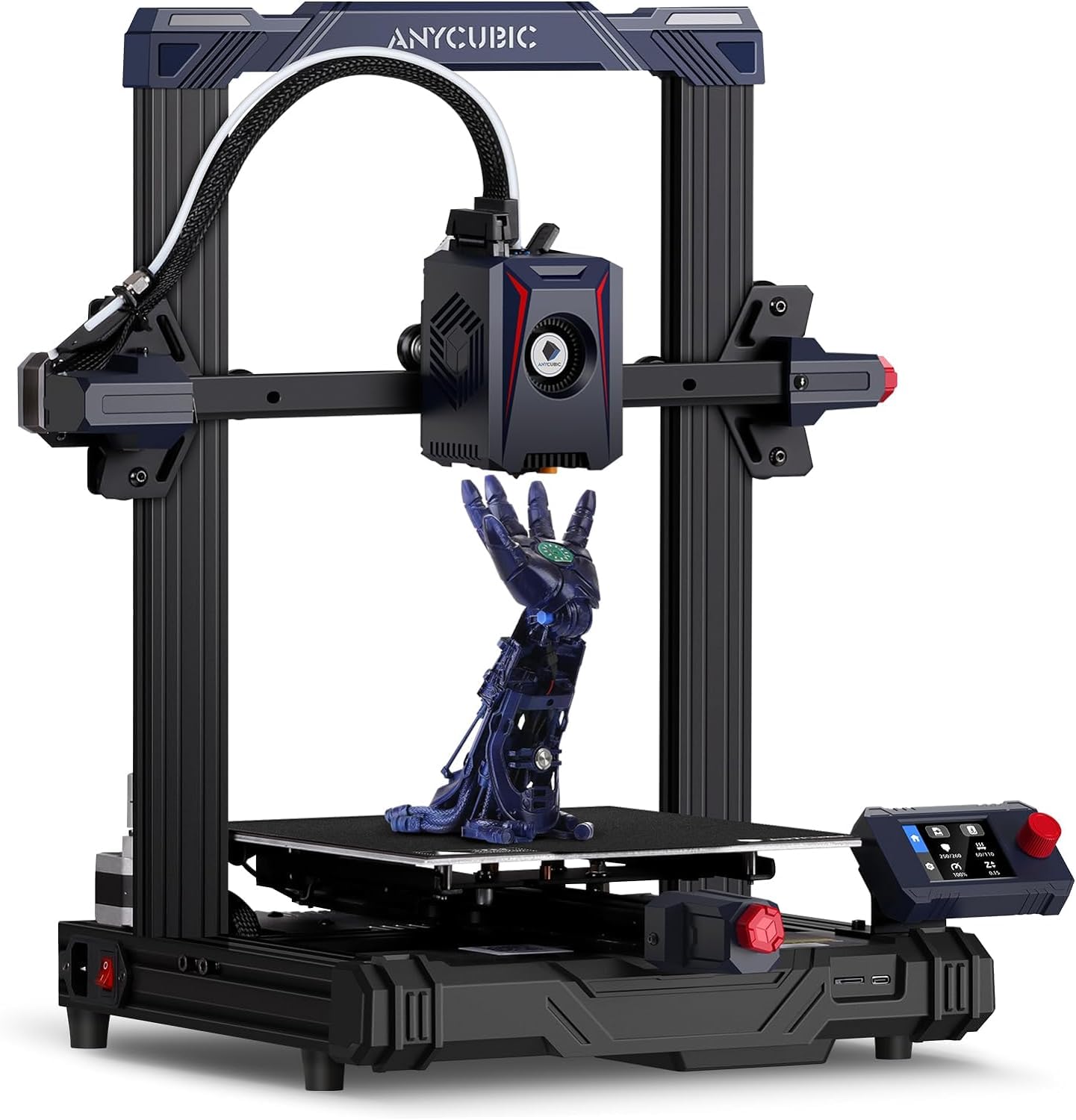
Anycubic Kobra 2 Neo 3D printer front view on a desk showing the open aluminium-extrusion frame, PEI magnetic build plate and 4.3-inch LCD with control knob
Amazon's Choice

Anycubic Kobra 2 Neo 3D Printer – 250mm/s Speed, LeviQ 2.0 Auto-Leveling, Ideal for Beginners

4

Anycubic's Kobra 2 Neo is the most affordable LeviQ 2.0 auto-levelling FDM 3D printer on Amazon.in at ₹15,499 — a 220×220×250mm bed slinger pitched at first-time owners who want auto-bed-level out of the box without paying Bambu Lab money, but who don't mind tinkering and learning the slicer along the way.

₹15,499Price as of 13 Jun 2026
Check Price on Amazon→Official site →
The Bottom Line

At ₹15,499 the Anycubic Kobra 2 Neo is the cheapest LeviQ 2.0 auto-levelling FDM printer you can buy on Amazon.in in 2026, and the most credible step up from a manually-trammed Creality Ender 3 kit without spending ₹24,000+ on a Bambu A1 Mini. You give up the Bambu-class plug-and-play polish — no Wi-Fi, no AI failure detection, an LCD-and-knob UI instead of a touchscreen — but you get 60W hot-end speed, a 4-star 632-rating Amazon track record, and the cheapest entry into auto-levelled FDM in India.

Best for
First-time 3D printer owners on a strict sub-₹15,500 budgetHobbyists who want auto bed levelling without paying Bambu pricesSTEM students and school projects in PLA and TPUTinkerers happy to learn slicer settings and tune profiles
Skip if
You want plug-and-play with zero learning curve — buy a Bambu A1 Mini insteadYou need Wi-Fi, mobile-app monitoring or a touchscreen UIYou print mainly ABS, ASA, polycarbonate or carbon-fibre composites
build
3.8 /5
performance
4 /5
value
4.5 /5
design
3.8 /5
Anycubic Kobra 2 Neo 3D printer front view on a desk showing the open aluminium-extrusion frame, PEI magnetic build plate and 4.3-inch LCD with control knob
Anycubic Kobra 2 Neo integrated direct-drive extruder detail shot with the 60W all-metal hot-end, 7000 rpm radial part-cooling fan and PTFE filament feed
Anycubic Kobra 2 Neo printing a sample model on its 220×220×250mm heated build plate, showing the LeviQ 2.0 inductive probe at the side of the hot-end

Overview

The Anycubic Kobra 2 Neo is the cheapest auto-levelling FDM 3D printer worth recommending in India in 2026. At a street price of ₹15,499 on Amazon.in — down from a ₹23,245 MRP, a 33% discount at the time of writing — it sits in a very specific gap in the budget printer market: a few hundred rupees above the manually-trammed Creality Ender 3 family, and roughly ₹9,000 below the Bambu Lab A1 Mini that has otherwise eaten the "easy first printer" recommendation slot.

The value proposition is narrow but real. You get Anycubic's LeviQ 2.0 25-point automatic bed-level mesh, a 60 W integrated hot-end with a 7000 rpm part-cooling fan, a 220 × 220 × 250 mm build volume, and a 250 mm/s rated top speed (Anycubic's recommended setting is 150 mm/s for clean prints — keep that number in mind, the headline 250 mm/s is a marketing ceiling, not a setting you'll actually print at). The listing on Amazon.in is the genuine Kobra 2 Neo unit on ASIN B09QGTTQKG — not the original Kobra Neo, the Kobra 2, the Kobra 2 Pro, the Kobra 2 Plus or the Kobra 2 Max. Anycubic's Kobra lineup is genuinely confusing in 2026 (the Kobra 3, Kobra 4, Kobra S1 and Kobra X have all launched since), so confirm the title says "Kobra 2 Neo" before you check out.

This review is written for a buyer with a hard sub-₹16,000 budget who has already weighed the Bambu A1 Mini and decided the extra ₹9,000 isn't justified, or who specifically wants a Marlin-firmware bed slinger they can tinker with. If those framings don't fit you, the A1 Mini is almost always the better recommendation and we say so explicitly throughout this review.

Design & Build

The Kobra 2 Neo is a classic FDM bed slinger — the heated build plate moves on the Y axis, a single Z-screw lifts the gantry, and the toolhead rides the X axis on V-slot rollers. The frame is open aluminium-extrusion, 489 × 430 × 486 mm assembled with a 7 kg unboxed weight, and Anycubic ships it as a three-module fast-assembly kit: the base, the gantry and the spool arm bolt together in roughly 15-20 minutes with the supplied 2.5 / 2.0 / 1.5 mm hex keys. There is no fully pre-assembled SKU — first-time owners should set aside half an hour and follow Anycubic's printed quick-start booklet rather than improvising.

The headline mechanical upgrade over the original Kobra Neo is the new integrated direct-drive extruder with a 60 W heater cartridge in an all-metal hot-end (Anycubic rates it to 260 °C) and a 7000 rpm radial part-cooling fan, paired with a PEI-coated spring-steel magnetic build plate that pops free for print removal. The double-gear extrusion is on the toolhead itself, which makes TPU and other flexibles realistic on this machine in a way the original Kobra Neo struggled with.

The user interface is the area buyers most often misread the listing on. Amazon's "About this item" bullet describes the 4.3-inch display as a "touch screen", but the Kobra 2 Neo actually ships with a 4.3-inch LCD driven by a physical control knob — same Marlin-firmware workflow as the Ender 3 V2 / S1 family, not the capacitive touchscreens you get on the Kobra 3, Bambu A1 Mini or Creality K1. Connectivity is local-only: a microSD-style U-disk slot plus a USB-C port on the base. There is no Wi-Fi, no Ethernet, no built-in camera and no mobile app — slice on a laptop with Anycubic Slicer Next, PrusaSlicer or OrcaSlicer, copy the G-code to the U-disk, and start the print from the knob. In the box you get the printer modules, the PEI plate, a sample PLA spool, scraper, side cutters, spare nozzle, hex keys, the power brick, a 230 V Indian power cord (importer / packer: WOL3D India Limited, Mumbai), and the printed manual.

Performance & Real-World Use

The honest performance summary is that the Kobra 2 Neo prints PLA, PETG and TPU at sub-Bambu speeds but at sub-Bambu prices, with a sub-Bambu learning curve. Expect to spend your first weekend dialling in retraction, flow and temperature for whichever filament you bought, instead of pressing one button and walking away — that is the actual trade you are making at ₹15,499 versus ₹24,499.

The headline speed number is 250 mm/s, but Anycubic's own recommended setting in their Slicer Next profiles is 150 mm/s, and that is the realistic figure to plan around. At 150 mm/s with input shaping enabled in the stock Marlin firmware, the Kobra 2 Neo prints a 3DBenchy in roughly 25-35 minutes with clean walls and acceptable overhangs in PLA — fast for the money, but materially slower than the Bambu A1 Mini's 14-minute Benchy on default settings. Push the slider to the marketing-headline 250 mm/s and you start seeing visible ringing, layer-shift risk on tall narrow parts, and rougher overhangs; this is a bed slinger with a single Z-screw, not a CoreXY, and the mechanical limits show up at the top of the speed envelope. Anycubic's linear-advance plus input-shaping firmware tuning meaningfully reduces ringing at moderate speeds (150-200 mm/s) so a tuned profile genuinely is faster than an Ender 3 in real-world prints.

LeviQ 2.0 — Anycubic's 25-point inductive bed-mesh probe with intelligent Z-offset compensation — is the single feature that makes this printer worth ₹15,499 over an Ender 3. It runs a four-to-five-minute mesh at the start of every print, then auto-tunes the Z-offset so your first layer is consistently glued down without paper-tramming. Long-term reliability is the most common owner complaint (mixed reports of LeviQ sensor drift after 4-6 months of heavy use) — keep the probe and bed surface clean, and re-run a mesh whenever a print won't stick. PLA, PETG and TPU all print well; the bed reaches roughly 100 °C and Anycubic officially lists ABS support, but with no enclosure you will fight warping on anything larger than a phone-case footprint, and ASA / polycarbonate / nylon are not realistic on an open-frame budget machine in Indian ambient humidity.

India-specific notes: the printer is 230 V mains compatible (the Indian unit ships with a three-pin BIS-compliant power cable via WOL3D), filament availability is excellent thanks to Indian-stocked WOL3D PLA Pro+, eSUN PLA+, Polymaker PolyLite and Anycubic's own filament line (₹699-1,500 per 1 kg PLA spool, next-day delivery in metros), and energy draw is roughly 350 W peak during heat-up dropping to ~120 W during steady-state printing — a multi-hour print costs cents on the rupee, not the tens of rupees first-time owners often fear.

Key Specifications

Printer TypeFDM (Fused Deposition Modelling), single-extruder bed slinger
Build Volume220 × 220 × 250 mm (W × D × H)
Max Print Speed250 mm/s (marketing ceiling)
Recommended Print Speed150 mm/s (Anycubic Slicer Next default)
Hot-EndIntegrated direct-drive, 60 W all-metal, max temperature 260 °C
Part-Cooling Fan7000 rpm radial fan
Nozzle0.4 mm standard (compatible with 0.2 / 0.6 / 0.8 mm)
Heated Build PlatePEI-coated spring-steel magnetic plate, max ~100 °C
Auto Bed LevellingAnycubic LeviQ 2.0 — 25-point inductive mesh with intelligent Z-offset compensation
FirmwareMarlin with linear advance and input shaping
Supported FilamentsPLA, PETG, TPU, ABS (1.75 mm)
Not RecommendedASA, polycarbonate, nylon, carbon / glass-fibre composites (open-frame, no enclosure)
Display4.3-inch LCD with physical control knob (NOT a touchscreen)
ConnectivityUSB-C, U-disk (microSD-style) — no Wi-Fi, no Ethernet, no mobile app
SlicerAnycubic Slicer Next, PrusaSlicer or OrcaSlicer (community profiles)
SensorsFilament run-out detection, power-loss resume printing
FrameOpen aluminium-extrusion, single Z-screw, V-slot wheels
AssemblyThree-module fast assembly — roughly 15-20 minutes with supplied hex keys
Product Dimensions489 × 430 × 486 mm assembled
Item Weight7 kg
Power230 V mains compatible (BIS-compliant Indian power cord supplied)
In the BoxPrinter modules, PEI plate, sample PLA spool, scraper, side cutters, spare nozzle, hex keys (2.5/2.0/1.5 mm), power brick, U-disk, printed manual
Country of OriginChina
Indian Importer / PackerWOL3D India Limited, 19/B(1), 2nd Floor, Hakoba Compound, Kalachowky, Mumbai - 400033
Warranty (India)One-year manufacturer warranty per Anycubic's standard policy, serviced via WOL3D India — keep your Amazon invoice.

Pros & Cons

✅ What We Liked

+Cheapest auto-levelling FDM 3D printer on Amazon.in at ₹15,499 — Anycubic's LeviQ 2.0 25-point bed-mesh probe with intelligent Z-offset compensation is the single feature that justifies the ~₹500 premium over a manually-trammed Creality Ender 3.
+Integrated direct-drive extruder with a 60 W all-metal hot-end and 7000 rpm radial part-cooling fan handles PLA, PETG and flexible TPU reliably — the new extruder is a genuine generational improvement over the original Kobra Neo.
+Anycubic's linear-advance plus input-shaping firmware tuning meaningfully reduces ringing at 150-200 mm/s — a properly profiled Kobra 2 Neo prints noticeably faster and cleaner than an Ender 3 at the same price.
+Fast three-module assembly — base, gantry and spool arm bolt together in roughly 15-20 minutes with the supplied hex keys, far less intimidating than the Ender 3 family's hour-long DIY build for first-time owners.
+PEI-coated spring-steel magnetic build plate flexes free for clean print removal without scraping or hairspray — a meaningful quality-of-life upgrade for beginners over the original Kobra Neo's textured plate.
+Resume-print after power loss and filament run-out detection are standard — power cuts mid-print won't destroy a long job, which matters in Indian Tier-2 / Tier-3 city power conditions.
+Sold and imported by WOL3D India Limited (Mumbai) with a one-year manufacturer warranty per Anycubic's standard policy, on a 230 V BIS-compliant power cord — proper Indian after-sales coverage rather than a grey-market import.
+Currently #3 best-seller in Amazon.in 3D Printers with an "Amazon's Choice" badge and a 4.0-star rating across 632 long-term reviews — a multi-year sales track record, not a fresh listing with no history.

⚠️ What Could Be Better

−No touchscreen — the 4.3-inch display is driven by a physical control knob like an Ender 3 V2, despite Amazon's "About this item" bullet calling it a "touch screen" (it isn't). Amazon listing copy is incorrect; the Anycubic spec sheet and every reviewer agree.
−No Wi-Fi, no Ethernet, no mobile app and no built-in camera — slicing happens on a laptop and prints are loaded from the supplied U-disk over the USB-C port. If you want remote monitoring or to start prints from your phone, the Bambu A1 Mini (Bambu Handy) or the Kobra 3 is the right purchase, not this one.
−Headline 250 mm/s top speed is a marketing ceiling, not a setting — Anycubic's own slicer profile recommends 150 mm/s, and pushing the slider higher introduces visible ringing and layer-shift risk on tall narrow prints. Plan around the recommended setting, not the headline.
−Mixed long-term reliability — owner reports of LeviQ 2.0 sensor drift and first-layer issues after 4-6 months of heavy use are common; budget for occasional re-meshing, nozzle swaps and PTFE-tube replacement as a normal part of ownership.
−Open-frame single-Z-screw bed slinger — no enclosure means ABS will warp on anything larger than a phone case, and ASA, polycarbonate, nylon and carbon-fibre composites are not realistically supported on this printer in Indian ambient humidity.
−Steeper learning curve than the Bambu A1 Mini — first-time owners will spend their first weekend dialling in retraction, flow and temperature in the slicer for each new filament; the Bambu reduces that to a one-button auto-calibration sweep.
−Anycubic Kobra lineup is confusingly named — make sure the Amazon listing title says "Kobra 2 Neo" before you check out; the Kobra Neo, Kobra 2, Kobra 2 Pro, Kobra 2 Plus, Kobra 2 Max, Kobra 3 and Kobra S1 are all different machines at different price points.

Anycubic Kobra 2 Neo 3D Printer – 250mm/s Speed, LeviQ 2.0 Auto-Leveling, Ideal for Beginners vs Alternatives

ProductPriceRatingStandoutWatch out for
Anycubic Kobra 2 Neo 3D Printer – 250mm/s Speed, LeviQ 2.0 Auto-Leveling, Ideal for Beginners (this review)₹15,4994 / 5Cheapest auto-levelling FDM 3D printer on Amazon.in at ₹15,499 — Anycubic's LeviQ 2.0 25-point bed-mesh probe with intelligent Z-offset compensation is the single feature that justifies the ~₹500 premium over a manually-trammed Creality Ender 3.No touchscreen — the 4.3-inch display is driven by a physical control knob like an Ender 3 V2, despite Amazon's "About this item" bullet calling it a "touch screen" (it isn't). Amazon listing copy is incorrect; the Anycubic spec sheet and every reviewer agree.
WOL 3D Ender 3 DIY 3D Printer – Resume Function, 220×220×250mm Build, Easy Assembly₹14,9994.1 / 5——
Bambu Lab A1 Mini 3D Printer – 500mm/s Speed, 180×180×180mm Build, Full-Auto Calibration, AI Failure Detection₹24,4994.3 / 5——

Who Should Buy It

Buy this if…

Buy the Anycubic Kobra 2 Neo if you have a hard sub-₹16,000 budget for a 3D printer and you specifically want auto bed levelling — the LeviQ 2.0 mesh probe is the single feature that makes this machine meaningfully better than an Ender 3 at almost the same price. It's the right pick for STEM students printing engineering project parts in PLA, hobbyists printing miniatures and small functional parts, and tinkerers who enjoy dialling in slicer profiles as part of the fun. If your projects fit inside 220 × 220 × 250 mm and you stick to PLA, PETG and TPU, you'll get your money's worth.

Skip it if…

Skip the Kobra 2 Neo if you've never owned a 3D printer and your honest preference is "just press print, don't make me learn slicer settings" — for that buyer the Bambu Lab A1 Mini at ₹24,499 is straightforwardly the right answer despite the ₹9,000 price premium. Skip it if you need Wi-Fi, mobile-app monitoring, a touchscreen UI, or AI failure detection. Skip it if your prints regularly exceed 220 mm in any axis, or if you specifically need to print ABS, ASA, polycarbonate or nylon — those filaments need an enclosed printer the Kobra 2 Neo isn't.

Frequently Asked Questions

Is the Amazon.in listing really the Anycubic Kobra 2 Neo, or a different Kobra variant?+

It is the genuine Anycubic Kobra 2 Neo — ASIN B09QGTTQKG, sold and imported by WOL3D India Limited (Mumbai), Anycubic's authorised Indian distributor. Anycubic's Kobra lineup is genuinely confusing — Kobra, Kobra Neo, Kobra Go, Kobra 2, Kobra 2 Neo, Kobra 2 Pro, Kobra 2 Plus, Kobra 2 Max, Kobra 3, Kobra 3 Combo, Kobra 4, Kobra S1 and Kobra X have all shipped since 2022 — so confirm the listing title literally says "Kobra 2 Neo" before checking out, and double-check the ASIN matches B09QGTTQKG. The Kobra 2 (no "Neo") and Kobra Neo (no "2") are different older machines without LeviQ 2.0 and the new 60 W hot-end.

What does LeviQ 2.0 actually do in plain English?+

LeviQ 2.0 is Anycubic's automatic bed-levelling system. At the start of every print, an inductive sensor on the toolhead taps a 25-point grid across the heated bed (5×5 mesh) and measures how high or low each point sits relative to the nozzle. The firmware then mathematically compensates for the bed's tilt and warp as the first layer prints, so your model glues down evenly without you having to manually turn levelling knobs and slide paper under the nozzle (the "tramming" ritual that defined Ender 3 ownership for years). LeviQ 2.0 also adds intelligent Z-offset auto-tuning, so the gap between the nozzle and the first layer is set automatically. In practice it adds 4-5 minutes to the start of each print and saves you the most frustrating part of beginner 3D printing.

What is the real-world print speed versus the advertised 250 mm/s?+

Plan around 150 mm/s, not 250 mm/s. The 250 mm/s figure is the firmware ceiling and what Anycubic puts on the marketing page; Anycubic Slicer Next's own default profile for the Kobra 2 Neo recommends 150 mm/s for clean prints, and that is the speed at which the printer's linear-advance and input-shaping tuning actually deliver acceptable surface quality. Push the slider toward 200-250 mm/s and you start seeing visible ringing on detailed parts, rougher overhangs and layer-shift risk on tall narrow geometry — this is a single-Z-screw bed slinger, not a CoreXY, and the mechanical limits show. A profiled Kobra 2 Neo at 150 mm/s is still meaningfully faster than an Ender 3 at the same price.

Anycubic Kobra 2 Neo vs WOL 3D Ender 3 — which budget printer should I buy in India?+

Both are sub-₹15,500 FDM bed slingers and both ship from WOL3D India on Amazon.in. The Ender 3 is roughly ₹500 cheaper, has a 15,000+ rating count proving multi-year reliability, and benefits from a decade of community mods and YouTube tutorials. The Kobra 2 Neo costs ₹500 more but gives you LeviQ 2.0 automatic bed levelling, a faster 60 W hot-end (250 mm/s rated vs 180 mm/s on the Ender 3) and a new direct-drive extruder that handles TPU better. If you genuinely enjoy tinkering as a hobby, the Ender 3 is the more "moddable" platform with a bigger community. If you want the same DIY price point but with auto-bed-level so you don't have to learn paper-tramming, the Kobra 2 Neo is worth the extra ₹500. Either way, this is the budget tier.

Anycubic Kobra 2 Neo vs Bambu Lab A1 Mini — when does the +₹9,000 step up actually justify itself?+

The Bambu A1 Mini at ₹24,499 is roughly ₹9,000 more than the Kobra 2 Neo at ₹15,499 and is the better recommendation for almost every first-time owner who can stretch the budget. The Bambu adds: full-auto calibration (Z-offset, bed mesh, vibration resonance, flow rate — all hands-off, every print), Wi-Fi and the Bambu Handy mobile app, AI spaghetti and first-layer failure detection, a built-in 1080P timelapse camera, a true touchscreen UI, ≤48 dB acoustics with active motor noise cancellation, and a 500 mm/s rated speed that produces a clean 14-minute Benchy on default settings. The Kobra 2 Neo justifies itself only when ₹15,499 is the hard budget cap, or when you specifically want a Marlin-firmware bed slinger you can tinker with. For anyone whose time has any value, the Bambu is the right call.

What's the warranty situation in India and who handles service?+

The Kobra 2 Neo carries a one-year manufacturer warranty per Anycubic's standard policy. The Amazon.in listing is sold and imported by WOL3D India Limited (Mumbai), Anycubic's authorised Indian distributor, so warranty claims, spare parts (nozzles, PTFE tubes, hot-end blocks, PEI plates) and after-sales support go through WOL3D — not through Amazon's own warranty system. Keep your Amazon invoice as proof of purchase, register the printer on the Anycubic support portal at anycubic.com, and raise warranty / replacement-parts requests through WOL3D customer support. Common consumables (nozzles, build plates, fans, PTFE tube) are stocked on Amazon.in and are inexpensive.

What filaments work on the Kobra 2 Neo in India and where do I buy them?+

Stick to 1.75 mm PLA, PETG and TPU as your everyday filaments. Indian-stocked options on Amazon.in include WOL3D PLA Pro+ (₹699-899 per 1 kg spool, next-day delivery in metros), eSUN PLA+ and PETG (₹999-1,499), Polymaker PolyLite PLA (₹1,200-1,800) and Anycubic's own filament line via WOL3D. ABS is officially supported by the firmware and the heated bed reaches ~100 °C, but with no enclosure you will fight warping on anything larger than a phone-case footprint in Indian ambient conditions — treat ABS as edge-case, not daily-use. ASA, polycarbonate, nylon and carbon / glass-fibre composites are not realistically printable on this open-frame machine; if you need those, look at an enclosed printer instead.

What is actually in the box and do I need to buy anything else to start printing?+

The Amazon.in box contains the three printer modules (base, gantry, spool arm), the PEI-coated spring-steel magnetic build plate, a small sample PLA spool to print Anycubic's test model, a 0.4 mm spare nozzle, hex keys (2.5 / 2.0 / 1.5 mm), side cutters, a scraper, the power brick with a 230 V BIS-compliant Indian three-pin cord, a U-disk with starter G-code and slicer profiles, and the printed quick-start manual. To start printing your own designs you'll want a 1 kg PLA spool (the sample spool runs out fast) and ideally a glue stick and isopropyl alcohol for first-layer adhesion — budget roughly ₹1,000 in consumables beyond the printer itself.

How loud is the Kobra 2 Neo, and is it OK to leave it printing overnight at home?+

The Kobra 2 Neo is a budget open-frame bed slinger and Anycubic does not publish a quiet-mode dB rating — third-party reviewers consistently measure it in the 50-55 dB range during normal printing, which is noticeably louder than a Bambu Lab A1 Mini (≤48 dB with active motor noise cancellation) and roughly the same as an Ender 3 V2. The cooling fans audibly spin up during heavy infill and the Y-axis bed-slinger motion has a low-frequency thump that carries through wooden tables. Overnight printing in a bedroom is workable on a foam mat or in a separate room with the door closed, but it is not a "set it on the bedside table" printer the way the Bambu A1 Mini is.

How much electricity does the Kobra 2 Neo use during a long print?+

Peak draw during the initial heat-up of the bed and hot-end is roughly 350 W on a 230 V supply, dropping to steady-state ~120-150 W during actual printing once the bed is up to temperature. A typical 4-hour PLA print therefore uses roughly 0.5-0.6 kWh of electricity — at metro India tariffs of ₹6-9 per kWh, that works out to ₹3-6 per long print. Electricity cost is not a meaningful factor in 3D-printer ownership in India; filament cost is the variable that actually matters.

Our Verdict

In 2026 the Anycubic Kobra 2 Neo is the cheapest LeviQ 2.0 auto-levelling FDM 3D printer on Amazon.in and the most defensible sub-₹15,500 buy in the category — better than a manually-trammed Ender 3 by a ₹500 margin that buys you auto-bed-level, and meaningfully worse than the Bambu Lab A1 Mini in every dimension except price. We recommend it for buyers with a hard sub-₹16,000 budget cap, STEM students, and tinkerers who enjoy dialling in slicer profiles — and we don't recommend it for first-time owners who would rather spend the extra ₹9,000 on a Bambu A1 Mini and skip the learning curve entirely.

Ready to buy the Anycubic Kobra 2 Neo 3D Printer – 250mm/s Speed, LeviQ 2.0 Auto-Leveling, Ideal for Beginners?

Check the latest price on Amazon. You pay nothing extra — we earn a small commission.

Price as of 13 Jun 2026

Check Price — ₹15,499→
Looking for more options? See today's top deals →

Liked this pick?

Get weekly curated recommendations straight to your inbox.

This post contains affiliate links. As an Amazon Associate, I earn from qualifying purchases at no extra cost to you.

You might also like

Sony WH-1000XM5 thumbnail

Sony WH-1000XM5

4.5
₹27,627
boAt Airdopes 141 Gen 2 thumbnail

boAt Airdopes 141 Gen 2

3.8
₹999
Apple iPhone 17 Pro Max thumbnail

Apple iPhone 17 Pro Max

4.5
₹1,49,900