Affiliate Disclosure: YourPickBuddy earns from qualifying purchases across our retail partners (Amazon Associates, Flipkart Affiliate and others). This page may contain affiliate links — when you buy through our links, we may earn a small commission at no extra cost to you. Prices and availability are subject to change.
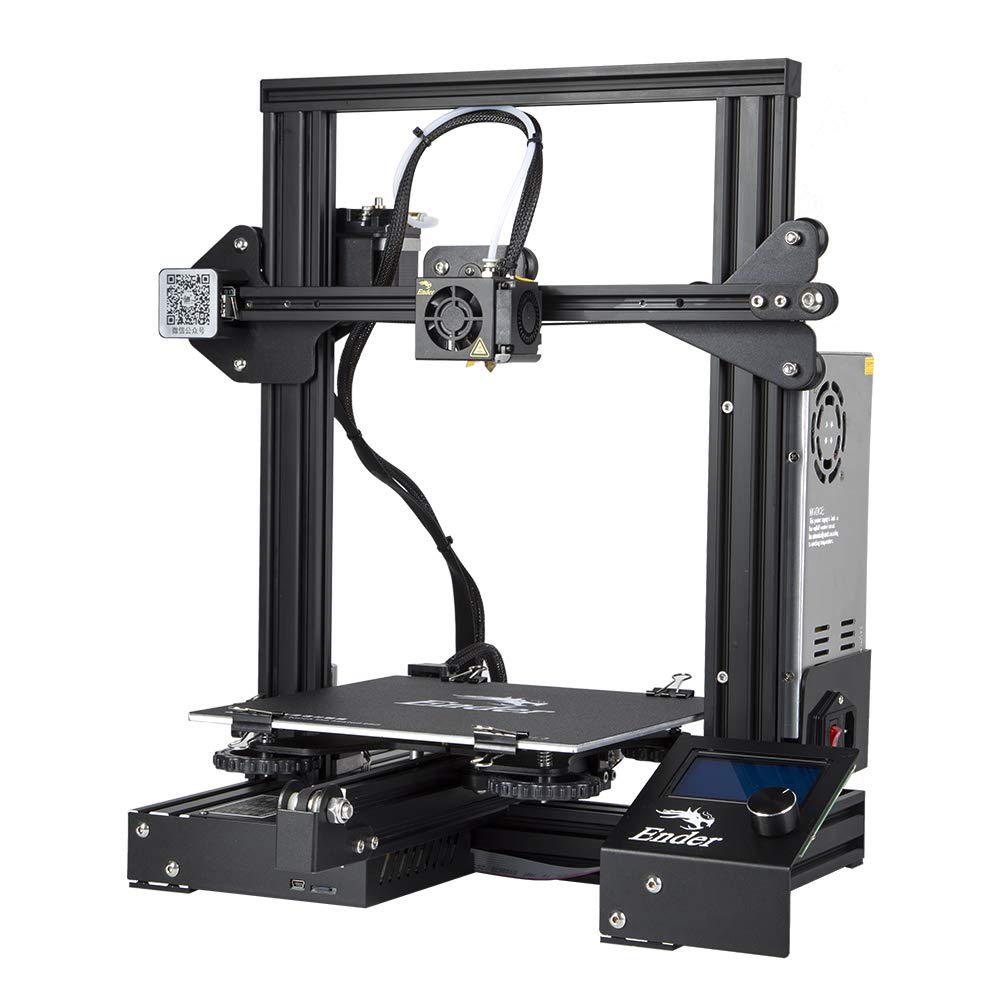
WOL 3D Ender 3 DIY 3D Printer – Resume Function, 220×220×250mm Build, Easy Assembly

The classic Creality Ender 3 — sold in India by WOL3D as the "Ender 3 Model 2021" — is the original DIY 3D-printer kit that defined the sub-₹15,000 category: 220 × 220 × 250 mm build volume, manual bed levelling, MK-8 single-gear extruder, V-slot POM wheels, resume-on-power-loss, and a ₹14,999 sticker price backed by 15,500+ Amazon ratings.
We track this price on every audit · monitoring since 16 Aug 2026
Overview
The Creality Ender 3 is the most-shipped consumer 3D printer in history. It launched in 2018, sold past one million units before the end of 2021, and effectively built the modern hobbyist 3D-printing community around itself — every YouTube tutorial, every Reddit fix-it thread, every "best first printer" list of the last seven years assumes you either own one or are about to. On Amazon.in the unit you actually get when you click the affiliate link is the original Ender 3 kit packaged by Comgrow (a Creality sub-brand) and imported by WOL3D India as "WOL 3D Ender 3 Model 2021". It is the V1 — not the V2 with the glass bed and silent board, not the Pro with the magnetic plate, not the V3 SE with auto-levelling, and not any of the Neo / S1 / V3 variants. Knowing exactly which Ender 3 you are buying matters because Amazon search blurs all of them together and the price gap between this kit and a Neo or V3 SE is real money.
In India this specific SKU — ASIN B07BR3F9N6 — has been on sale since May 2018 and currently sits at ₹14,999 (down from a ₹30,000 MRP, a 50% discount on the listing), with a 4.1-star average across 15,519 reviews and the "Amazon's Choice" badge in the 3D Printers category. It is sold by Clicktech Retail (Amazon's own fulfilment vehicle), shipped by Amazon and imported and warranted by WOL3D India Pvt. Ltd., who describe themselves as "the first and official distributor of Creality 3D on Amazon.in". Warranty is one month via Amazon plus WOL3D-level after-sales for the rest; spare parts (hot-ends, nozzles, glass beds, BLTouch kits, mainboards) are kept in stock on the same marketplace.
This review is written for someone deciding between the Ender 3, the Anycubic Kobra 2 Neo at ₹15,499 (same 220 × 220 × 250 mm build volume but with LeviQ 2.0 auto-levelling and 250 mm/s max speed) and the Bambu Lab A1 Mini at ₹24,499 (smaller 180 mm³ build but full-auto calibration, 500 mm/s, near-silent acoustics). We will tell you exactly when the Ender 3 is still the right call in 2026 and when you should put the extra ₹500 or ₹9,500 down for something easier to live with.
Design & Build
The Ender 3 is a classic bed-slinger Cartesian printer in a V-slot 2020 aluminium-extrusion Prusa-i3-style frame, shipped semi-assembled in a 510 × 400 × 190 mm carton at 8.6 kg gross / 7 kg net. The assembled machine measures roughly 44 × 41 × 46.5 cm and footprints comfortably on a study desk. Build volume is 220 × 220 × 250 mm — meaningfully larger than the Bambu A1 Mini's 180 mm cube and the same as the Anycubic Kobra 2 Neo, enough for full-size cosplay parts, large terrain pieces, mid-size functional enclosures and most engineering prototypes that fit in your palm.
In the box you get the printer kit (Y-axis base pre-assembled with the heated bed and power supply; X-axis gantry, Z-rails, extruder, hot-end, display, filament holder and PSU shroud as separate sub-assemblies), an assembly toolkit (Allen keys, spanners, side cutters, putty knife), a small test spool of PLA (most reviewers describe it as throwaway-quality), a microSD card containing the Marlin firmware, a Cura-based slicer, the user manual PDF and a sample G-code, a microSD-to-USB adapter, a power cable, a 1.75 mm PTFE feeder tube and roughly 20 fasteners. Creality's manual advertises "10-minute assembly with 20 screws"; the realistic figure for a first-time builder following the included PDF plus the Creality YouTube assembly video is 90 minutes to 2 hours, and that matches what Amazon.in reviewers consistently report.
The hot-end is a single-gear MK-8 Bowden extruder, rated to a 255 °C nozzle and 110 °C heated bed — Creality's "branded power supply" reaches bed temperature in roughly 5 minutes. Motion runs on V-slot extrusions with POM wheels (quiet, but they need periodic eccentric-nut tensioning), a 42-step NEMA-17 stepper per axis, and a 32-bit Marlin-compatible mainboard with a 12864-style 4.3-inch knob-and-dial LCD — there is no touchscreen, no Wi-Fi, no filament-runout sensor, no automatic bed-levelling probe and no enclosure. Connectivity is microSD plus mini-USB. The build surface is Creality's standard "removable BuildTak-style sticker" on an aluminium plate, which many Amazon.in reviewers swap for a glass plate plus glue stick (the listing's top-helpful review explicitly recommends a 235 mm frosted-glass bed from a local glass-cutter) or a PEI magnetic sheet within the first month of ownership.
Performance & Real-World Use
For the first decade of consumer 3D printing the Ender 3 was the benchmark for "good enough print quality at the lowest possible price" and that has not really changed. Out of the box, after a careful first manual bed-levelling using the supplied A4-paper drag-test method and the four knurled knobs under the bed, the printer produces clean PLA prints at 0.2 mm layer height and 50-60 mm/s print speed with detail that holds up against anything in its price class. The nominal 180 mm/s travel speed in the spec sheet is exactly that — a travel speed; cleanest results sit around 50 mm/s for outer perimeters and 80-100 mm/s for infill, and any reviewer who tells you otherwise is overselling it.
Real-world reliability depends almost entirely on three things: bed levelling, first-layer adhesion and the build surface. The aluminium sticker bed is the printer's biggest single weakness — multiple Indian reviewers (including the 45-helpful-vote top review by Simbu and the long-form review by Pradum Pal) describe the centre of the bed as visibly concave out of the box and the standard workaround is to buy a flat 23.5 × 23.5 cm frosted-glass plate from a local glass-cutter or a PEI/magnetic sheet from WOL3D for around ₹500-1,200, plus a glue stick for adhesion. Once you do that, the Ender 3 prints PLA, PETG, TPU and wood-filled composites cleanly; it can technically print ABS but the open frame and ambient drafts make warping a problem unless you build an enclosure (a common upgrade — IKEA Lack-table enclosures, acrylic boxes and grow-tent enclosures are well-documented community mods). Carbon-fibre and glass-fibre filaments will chew through the brass nozzle quickly; swap it for a hardened-steel nozzle (₹250-400 on Amazon.in) if you go that route.
The Ender 3's real superpower in 2026 is its modding ecosystem. It is open-source down to the firmware (Marlin) and the entire 3D-printing community has used it as the platform for the last seven years of consumer-printer upgrades: BLTouch / CR-Touch auto-bed-levelling probes (₹1,500-2,000), Sprite or Microswiss direct-drive extruder conversions for flexible filaments (₹3,500-5,000), SKR / MKS silent stepper mainboards (₹2,500-4,000), Klipper firmware on a Raspberry Pi for input-shaping and 200+ mm/s effective print speeds (free, BYO Pi), magnetic-PEI build surfaces (₹600-1,200), all-metal hot-ends, dual-Z-axis upgrades, OctoPrint, Mainsail and Fluidd web interfaces — every single one of these is a step-by-step YouTube tutorial. No other printer at any price has this depth of community support, and that is the central reason engineering students, maker-lab managers and hobbyists who plan to spend the next year learning 3D printing still buy this kit over a Bambu Lab unit.
The two limitations you cannot mod away are speed and acoustics. Even on Klipper with input-shaping the original Ender 3 frame is not stiff enough for the 300-500 mm/s speeds the Bambu A1 Mini does on stock firmware, and the stock fans are audibly louder than the A1 Mini's motor-noise-cancelled ≤48 dB rating — a stock Ender 3 measures roughly 55-60 dB during printing and is loud enough that most owners do not run it in the bedroom they sleep in.
Key Specifications
Pros & Cons
✅ What We Liked
⚠️ What Could Be Better
WOL 3D Ender 3 DIY 3D Printer – Resume Function, 220×220×250mm Build, Easy Assembly vs Alternatives
| Product | Price | Rating | Standout | Watch out for |
|---|---|---|---|---|
| WOL 3D Ender 3 DIY 3D Printer – Resume Function, 220×220×250mm Build, Easy Assembly (this review) | ₹14,499 | 4.1 / 5 | Cheapest viable FDM 3D printer on Amazon.in at ₹14,999 with a real 220 × 220 × 250 mm build volume — bigger work area than any printer under ₹20,000 in the country. | Ships as a semi-assembled DIY kit — Creality's claimed "10 minutes with 20 screws" is marketing; a first-time builder following the manual and the YouTube assembly video realistically spends 90 minutes to 2 hours getting the gantry square and the eccentric nuts tensioned. |
| Anycubic Kobra 2 Neo 3D Printer – 250mm/s Speed, LeviQ 2.0 Auto-Leveling, Ideal for Beginners | ₹14,890 | 4 / 5 | — | — |
| Bambu Lab A1 Mini 3D Printer – 500mm/s Speed, 180×180×180mm Build, Full-Auto Calibration, AI Failure Detection | ₹23,998 | 4.3 / 5 | — | — |
Who Should Buy It
Buy this if…
Buy the Ender 3 if your reason for getting into 3D printing is partly the printing and partly the printer itself — engineering and mechatronics students who want a Cartesian platform they can take apart, school maker-labs that need three machines for the price of one Bambu, hobbyists who genuinely enjoy modding (BLTouch, direct drive, Klipper, PEI beds) and patient first-time owners who do not mind spending a weekend tramming a bed before the first clean print. At ₹14,999 it gives you the largest community of any printer ever sold, the cheapest path to a 220 × 220 × 250 mm build volume, and a machine that will absorb every upgrade the hobbyist community can throw at it for years.
Skip it if…
Skip the Ender 3 if "first 3D printer" means "press a button and print" to you. The manual bed levelling, the sticker build plate and the 1.5-2-hour assembly are not difficult once you understand them but they are a real time investment and a real source of frustration for beginners who expected a finished product. For an extra ₹500, the Anycubic Kobra 2 Neo adds LeviQ 2.0 auto-bed-levelling on the same 220 × 220 × 250 mm build envelope; for an extra ₹9,500, the Bambu Lab A1 Mini eliminates the entire learning curve at the cost of a smaller 180 mm cube. If your time is worth anything per hour, do the maths.
Frequently Asked Questions
Our Verdict
In 2026 the WOL3D / Creality Ender 3 is still the cheapest credible FDM 3D printer in India at ₹14,999, and the modding ecosystem around it is unmatched — but it ships as a 1.5-2-hour DIY kit with a manual-levelled, slightly concave aluminium bed, no auto-levelling probe and no filament-runout sensor, so you are paying ₹14,999 for a learning project, not a finished appliance. We recommend it for engineering students, maker-labs, patient first-time owners with a YouTube tab open, and anyone who genuinely enjoys upgrading their own printer. We do not recommend it for first-time owners who expected a press-and-print appliance — for ₹500 more, the Anycubic Kobra 2 Neo adds auto-bed-levelling on the same build volume; for ₹9,500 more, the Bambu Lab A1 Mini removes the entire learning curve. Buy with eyes open and you will still have one of the most rewarding ₹15,000s you can spend in 3D printing.
Ready to buy the WOL 3D Ender 3 DIY 3D Printer – Resume Function, 220×220×250mm Build, Easy Assembly?
Compare live prices across every store we track. You pay nothing extra — we may earn a small commission.
Price as of 07 Sept 2026
Was this review helpful?
Liked this pick?
Get weekly curated recommendations straight to your inbox.
Reader Comments
No comments yet. Own the WOL 3D Ender 3 DIY 3D Printer – Resume Function, 220×220×250mm Build, Easy Assembly? Share your experience — it helps other buyers decide.
This post contains affiliate links. As an Amazon Associate, I earn from qualifying purchases at no extra cost to you.